
RECIPE.md
This file is the brief: enough to build Board from an empty folder. The files next to it are one build of it. If they don’t work on your Herdr, or you want it different, build it again from here.
What you see
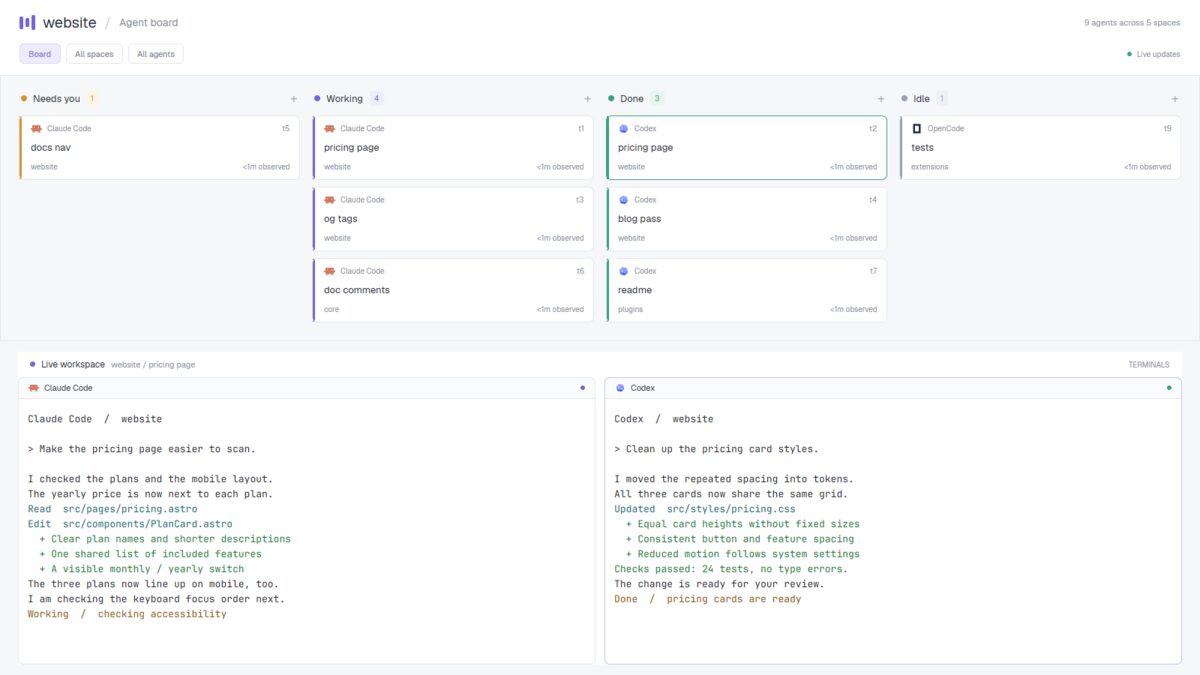
Three bands, top to bottom, filling the window (no title bar):
- The header, 100px, white. The active space’s name (20px, semibold), a violet three-bar mark and “/ Agent board”. On the right, the number of agents and spaces. Underneath: Board, All spaces and All agents chips, with a green dot and “Live updates” on the right.
- The board, 355px, pale gray (
#f6f7f9). Four equal columns with 16px gaps, each with a status dot, name, count and plus sign. Each column scrolls on its own. White cards are 86px high, with 7px corners and a 3px status stripe. They show program icon and name, terminal address, tab name (13px, semibold), space name and time observed in that state. - The workspace, the remaining height, inset 14px vertically and 24px horizontally. A 34px white rail says “Live workspace”, “space / tab” and “TERMINALS”. Below, the active tab’s terminals have white backgrounds, 7px corners, 12px gaps and 28px headers with program icons and status dots.
Colors: ink #252b37, muted #89909d, borders #e5e7ec, violet
#7465db. Text in Geist; terminal text is 13px.
How it behaves
| Status | Column and stripe | Count background |
|---|---|---|
| blocked | Needs you, amber #d79032 | #fff5e4 |
| working | Working, violet #7465db | #efedfd |
| done | Done, green #39a380 | #e8f6ef |
| idle | Idle, gray #99a0ad | #edf0f4 |
- Cards cover all spaces. Status changes move them to the matching column and update its count. Hovering a card colors its border to match.
- Clicking a card selects its agent’s space and tab. The workspace and its rail follow, while the board still shows everyone.
- Ages read “<1m observed”, then whole minutes. They refresh every 30s and restart when this board first sees a new status.
- The app’s next/previous agent keys follow column order, left to right.
Built from
- The layout (
layouts/board.json): a rootcolumnwithtitlebar: "none",theme: "paper"and its own colors. Two fixedblocks hold the header and cards; a remaining-heightcolumnholds the workspace rail andcontent: { tab: "active", pane: { … } }. Pane borders are 1px, focused#c8c1ef; terminal padding is[12, 10]. - One mod (
mods/board/), selected byprops().role:header,terminalsfor the workspace rail,pane, or none for the board.props().panefinds each header’s terminal inpanes(). - Data and commands:
agents(),spaces(),panes();run("agent.focus", { terminal })for cards andsetAgentOrder()on board renders. A 30,000ms timer updates locally observed ages. - Art: program icons, respecting
program.tint, and a layout preview SVG.mod.jsonusesplace: "none". No shipped mod or external program is needed for the board itself.
Watch out
- Board/filter chips and column plus signs do nothing. There is no dragging cards, creating tasks or filtering the board.
- Observed time is not the agent’s actual work duration. It starts locally and is lost when this copy restarts.
- The fixed-height board leaves only the rest of the window for terminals.
- The layout and mod bring their own palette rather than following the person’s colors throughout.
- If
boardis taken, rename the layout and mod references and themods/board/…preview path before installing.
Done when
- Every agent appears in the right column, and its count matches.
- Clicking a card shows its tab’s terminals and updates the workspace rail.
- A status change moves the card, and each column scrolls independently.
herdr-app check mods/boardpasses, and switching away and back works.