
RECIPE.md
This file is the brief: enough to build Mission from an empty folder. The files next to it are one build of it. If they don’t work on your Herdr, or you want it different, build it again from here.
What you see
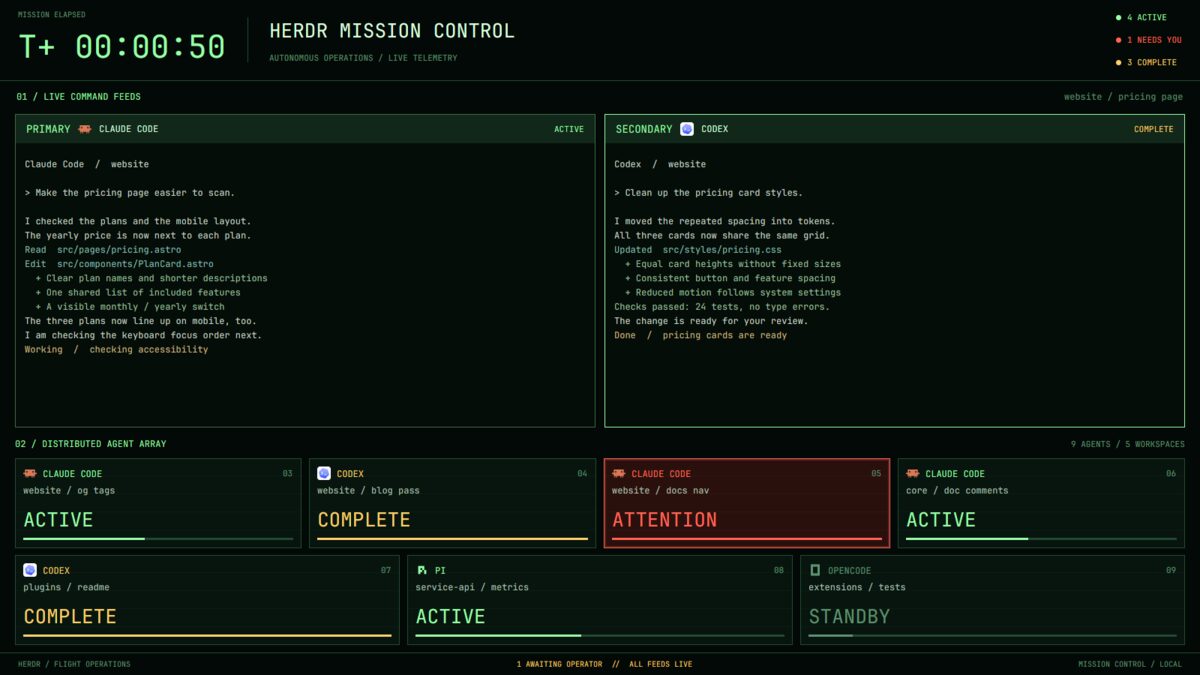
Four bands, top to bottom, filling the window (no title bar):
- Mission elapsed, 108px. “MISSION ELAPSED” above a large “T+ 00:04:28” clock (42px), a divider, then “HERDR MISSION CONTROL” (26px) and “AUTONOMOUS OPERATIONS / LIVE TELEMETRY”. On the right, three counts: ACTIVE, NEEDS YOU and COMPLETE.
- Live command feeds, taking the flexible height. A 22px rail says
“01 / LIVE COMMAND FEEDS”, with “space / tab” on the right. The active
tab’s terminals have square corners, 12px gaps, dark green backgrounds
(
#050d08) and 1px borders (#416b48, bright green when focused). Their 38px headers say PRIMARY or SECONDARY, agent icon and name, and the current status; non-agent terminals say CONNECTED. - The agent array, 278px. “02 / DISTRIBUTED AGENT ARRAY” and total agent/workspace counts above two rows of equal-width cards, with 10px horizontal gaps and 9px between bands. Cards show program icon and uppercase name, a number starting at 03, “space / tab”, large status text (26px), a thin bar and faint scan lines.
- The footer, 30px. “HERDR / FLIGHT OPERATIONS”, a count of agents awaiting the operator, “ALL FEEDS LIVE”, and “MISSION CONTROL / LOCAL”.
Colors: background #030906, cards #07150e, lines #234b32, green
#99ffa9, muted #5d9270, amber #ffd16a, red #ff6554. UI and
terminals use JetBrains Mono; terminal text is 12px.
How it behaves
| Status | Card | Bar and motion |
|---|---|---|
| working | green ACTIVE | 45%, opacity pulses over 1.8s |
| blocked | red ATTENTION on #2a100d | 100%, red border pulses over 0.9s |
| done | amber COMPLETE | 100%, still |
| idle | muted STANDBY | 12%, still |
- The array excludes agents in the active tab. Clicking a card selects that agent’s space and tab, putting its terminals into the feeds and updating the array and rail.
- The first terminal in the tab is PRIMARY; the others are SECONDARY.
- Counts include all agents, not just those in the array. The footer’s awaiting-operator count is the blocked count.
- The elapsed clock updates each second from the oldest known agent terminal’s creation time, falling back to when the clock first started.
- The app’s next/previous agent keys follow all agents in their usual order.
Built from
- The layout (
layouts/mission.json): a non-resizable rootcolumn,titlebar: "none",theme: "moss"and its own colors and fonts. A top block, middlecolumnwith padding[10, 20]and 12px gaps, and footer block. The middle holds the feed rail, flexiblecontent: { tab: "active", pane: { … } }, and fixed array block.pane.lone: trueframes single terminals; padding is[12, 12]. - One mod (
mods/mission/), usingprops().role:top,feeds,pane,gridorfooter(the fallback). Pane headers useprops().pane. - Data:
agents(),spaces(),panes()andterminals();created_mson terminals matching agent addresses supplies the clock. - Commands and motion:
run("agent.focus", { terminal })on cards,setAgentOrder()on grid renders. Onlytopruns a 1,000ms clock timer; native.loop("opacity", …)animates bars and borders. - Art: program icons respecting tint, simple drawn scan lines and a
preview SVG. The manifest uses
place: "none". No shipped mod or external CLI is needed.
Watch out
- Bars represent status, not measured progress. Never present 45% as how far the agent has got through its task.
- The array uses two rows without scrolling. Many agents squeeze into the same width; the fixed top, array and footer leave less room for feeds on a short window.
- “LOCAL” is fixed text, not a filter excluding remote agents.
- The palette is hardcoded in both layout and mod. If
missionis taken, rename the layout/mod references andmods/mission/…preview path.
Done when
- Agents show the right words, colors and bars, and the counts add up.
- Blocked borders and working bars pulse without an animation timer.
- Clicking a card shows its terminals and updates the feed rail and array.
herdr-app check mods/missionpasses, and switching away and back works.