
RECIPE.md
This file is the brief: enough to build Threads from an empty folder. The files next to it are one build of it. If they don’t work on your Herdr, or you want it different, build it again from here.
What you see
Three columns, left to right, with no system title bar:
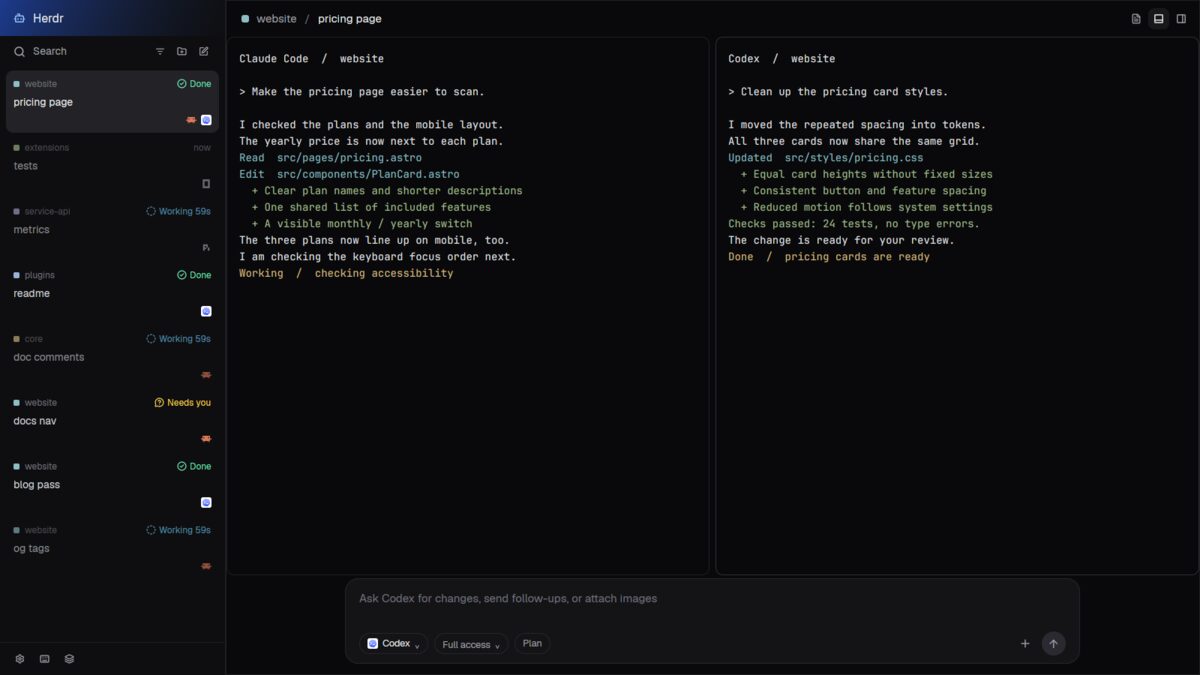
- The inbox, 300px wide (resizable, 220–460px). A 48px blue-to-black brand band says Herdr. Search, project filter, add-project and new-thread icons sit above a scrolling list. Each thread shows a colored project square, project name, optional machine, status or age, tab name, branch, up to three program icons and any pull-request badge. Pinned rows come first, then open work, with folded Snoozed and Settled shelves below. Settings, help and switch-layout icons sit in a 44px bottom strip.
- The thread, the flexible width. A 48px heading shows project / thread and details, terminal-drawer and right-panel toggles. Real terminals fill the middle, with 8px gaps, 10px corners and 1px borders, no custom headers. A 132px composer below has a rounded dark box, agent name, Full access, Plan, attach mark and blue send arrow. An optional 280px details card sits over the upper-right terminal area.
- The right panel, hidden initially, 560px wide when opened (320–1100px). Its 48px heading switches Files and Diff or closes the panel. Files has a searchable tree, and a read-only code view beside a 240px tree when a file is open. Diff shows file totals and expandable red/green changes.
Colors: background #09090b, inbox #0e0e10, right panel #0b0b0d,
text #ececee, muted #a1a1aa, borders #1f1f23, accent #60a5fa.
The new-thread dialog follows the theme. File code uses the settings font;
diff code falls back to JetBrains Mono.
How it behaves
- Working threads say “Working” with a duration in light blue (
#7dd3fc), blocked ones “Needs you” in yellow (#fcd34d), done ones “Done” in mint (#6ee7b7). Idle/no-status rows show time since their last change, if known. Quiet, unselected rows fade; activity does not reshuffle the open list. - Clicking a row opens its tab; right-click opens its tab menu. Hover reveals snooze, pin and Settle. Snooze offers 1 hour, Tonight (19:00), or Tomorrow (09:00); a later blocked or done update wakes it early. Shelves unfold on click, with Wake or Unsettle on hover. Settling the last open thread in a linked worktree offers removal, not automatic deletion.
- Search opens the picker; filter narrows the inbox to one project. Worktrees of one repository share a project. A PR badge opens its URL.
- New thread opens a dialog: type a name (up to 48 characters), choose project, current checkout/new worktree and Claude, Codex, Pi, Grok or shell. Enter starts; Ctrl+P cycles project, Ctrl+W checkout, Ctrl+A agent; Esc cancels.
- Click the composer to type; Enter or the arrow sends trimmed text to the focused agent and clears the box. With no agent or no text, nothing sends.
- The terminal drawer first splits a shell below the lead terminal; later clicks zoom/unzoom that lead terminal to hide/show its peers.
- Files supports expanding folders, path search and opening read-only files; Enter opens the first search match, Esc clears search. Diff expands one file at a time, comparing staged and unstaged changes against HEAD and including new files. The details toggle currently has a build error below.
Built from
- The layout (
layouts/threads.json): a resizable rootrow,titlebar: "none",theme: "graphite", its own colors and 1px dividers.sideandcenterare columns;mainusescontent: { tab: "active", pane: { … } }and a floatingdetailsblock. Hiddenpanelcontainspanel-headand apanel-bodystack, initiallydiff, withfilesanddiffchildren. Terminal padding is[16, 10]. - Eight mods (
mods/t4-*/):t4-threadsinbox and shared outline SVGs;t4-headusesprops().part(brandorcrumbs);t4-composersends;t4-newis a 640px dialog;t4-detailsis the Git card;t4-panel-headswitches surfaces;t4-filesandt4-diffread files. All manifests useplace: "none"; overlays getprops().overlay. - Shipped parts:
menu,picker,worktree, theworkspace-chrome/plus.svgasset andicons/agent.svg. - APIs:
spaces(),panes(),agents(),focused(),theme(),settings(),layout(),window(),home(),props(),shared()andsetShared(). Pins, snoozes, project scope, details and space colors use persistentt4.*/space.colorskeys; launch choices uselocalStorage. - Commands:
tab.select,tab.settle,tab.unsettle,tab.new,space.new,mod.open,pane.split,pane.zoom,pane.focus,layout.toggle,layout.show,layout.select,layout.switch,app.settings,app.helpand window minimize/maximize/close throughrun().openOverlay()/closeOverlay()handle dialogs and menus;hc(["send", address, text])sends follow-ups. No custom agent order. - Programs and files:
exec()runs Git discovery/status/list/diff,gh pr listand a local URL opener (open,xdg-open,explorer.exe). Files usesgit ls-files -co --exclude-standard, orrg --filesoutside Git, andreadTextFile()/EditorState. Diff usesgit diff HEADand reads new files. Operations pass the space/terminal’s machine where set. Details defines Commit asgit add -Athengit commit -m, Push asgit push -u origin HEAD, PR asgh pr create --fill --web, and editor launch ascode. - Timers: inbox ticks every 1s, notifying for short working durations or every 30 other ticks; PR queue drains every 1.5s with a 180s cache, skipping main/master/trunk/develop. Details polls every 4s only when enabled; Files every 5s, Diff every 3s. These copies can keep polling while hidden.
Watch out
- Details references undefined
onin render. Enabling it can fail before the card appears; its editor and Git buttons cannot be relied on as supplied. Commit would stage every change, not just one file, if that error is fixed. - Full access, Plan, attach and the composer’s agent selector are decoration. The composer handles simple typing/backspace, not a full text editor; it clears before send success and does not report send failures.
- New-thread text names the tab/branch; it is not sent as an agent task.
Launch commands are fixed: install the chosen
claude,codex,piorgrok. Git is required; PR features need authenticatedgh, non-Git file lists needrg, and URL opening needs the local system opener. - Files caps at 5,000 paths, 300 search results and 400,000 text characters. Polling refreshes the tree, not an already-open file’s contents. Diff caps each expanded view at 1,500 lines; new files do not add to its header totals.
- Much of the palette is hardcoded. Persistent shared keys survive layout
changes. If names are taken, rename all eight mod references, self-opening
names and
mods/t4-threads/…paths together, not shipped asset paths.
Done when
- Tabs appear as threads; selecting, pinning, snoozing, waking and settling work, and the project filter narrows the list.
- A new named thread starts the chosen installed program; a follow-up reaches the focused agent’s live terminal.
- The drawer shows/hides peers, and the right panel switches Files/Diff, opens real files read-only and expands real changes.
herdr-app checkpasses for all eight mods in their default state, and switching away and back works. Do not use the broken details card as a passing acceptance check.