
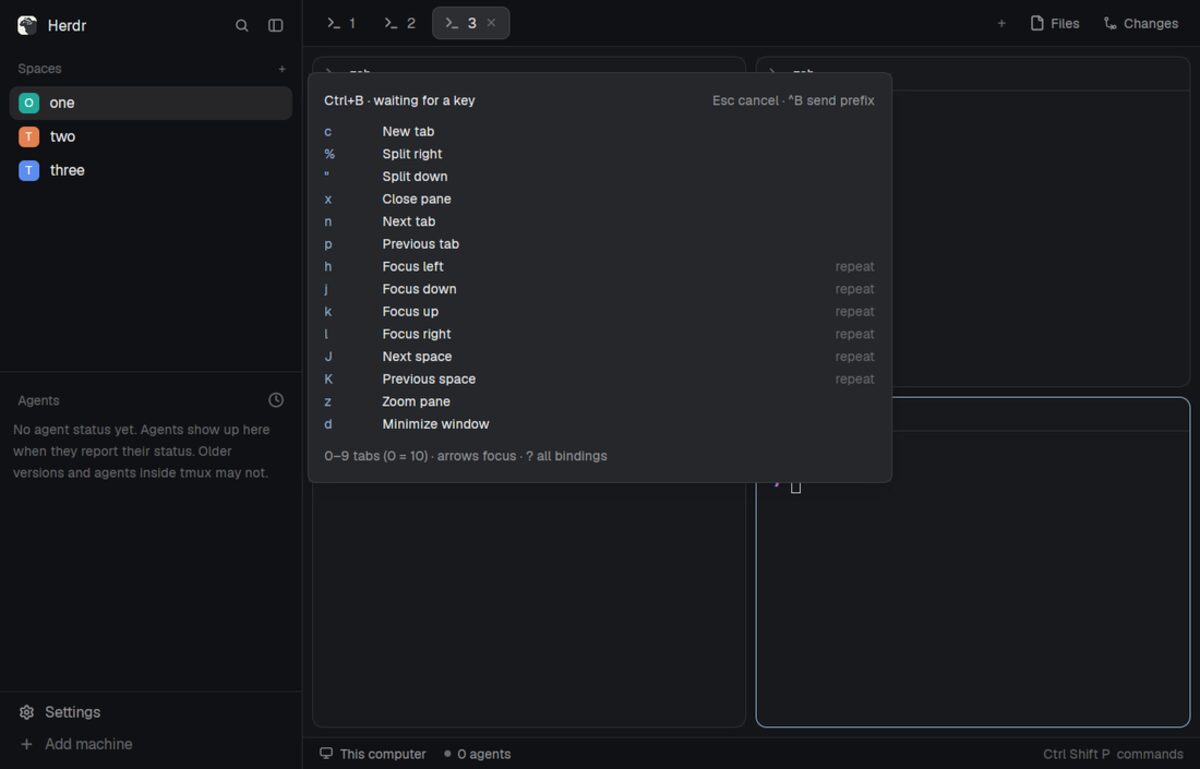
This file is the brief: enough to build Tmux prefix from an empty folder. The files next to it are one build of it. If they don’t work on your Herdr, or you want it different, build it again from here.
What you see
- A popup near the top of your window, 520px wide and 420px high, offset 64px from the top. Nothing is added to the layout itself.
- A heading, “Ctrl+B · waiting for a key”, with “Esc cancel · ^B send prefix” on the right. After a repeatable action the heading becomes “Repeat · 500 ms”.
- A scrollable list, 280px high, with the key on the left, its action in the middle and “repeat” on the right for actions you can repeat. The short list hides arrows and digits;
?toggles the full list. - A footer: “0–9 tabs (0 = 10) · arrows focus · ? all bindings”.
- Your theme’s popup background, foreground text, accent keys and muted hints. Text is 12px; the heading is semibold, with 14px padding around the popup and 8px gaps.
How it behaves
Ctrl+B opens the hint and waits without a timeout. The next key does this:
| Key | Action |
|---|---|
c | New tab |
% / " | Split right / down |
x | Close the focused pane and end its terminal |
n / p | Next / previous tab |
1–9, 0 | Select tab 1–9, 10 |
h j k l or arrows | Focus left / down / up / right; repeatable |
J / K | Next / previous space; repeatable |
z | Toggle pane zoom |
d | Minimize the window, leaving programs running |
? | Toggle the full binding list and wait without a timeout |
| Escape | Cancel |
| Ctrl+B | Send a literal Ctrl+B to the focused terminal |
After a repeatable action, you have 500ms to repeat it without another prefix. Each repeat restarts the window: Ctrl+B, J, J, K moves two spaces forward, then one back. A different bound key runs its prefix action and closes the hint unless it is repeatable.
An unbound key after the initial prefix just closes the hint. During the repeat window an unbound simple key goes to the now-focused terminal and closes the hint. Escape always cancels. Outside the hint, typing is untouched. There are no agent-status displays or animations.
Built from
-
One mod,
mods/tmux-prefix/, withmain.jsandmod.json. The manifest hasplace: "none"and a top popup overlay, so there is nolayouts/folder or layout change. -
A
keys.jsonsnippet with three bindings, merged into the person’s existing keys rather than replacing them:{ "global": { "ctrl-b": "mod.open:tmux-prefix" }, "terminal": { "ctrl-b": "mod.open:tmux-prefix" }, "mod:tmux-prefix": { "ctrl-b": "tmux-prefix.send-prefix" } }The global binding opens the popup outside a terminal; the terminal binding opens it while a terminal has focus. The mod-specific binding wins while the popup is focused, delivering a command through
nextCommand()that sends a literal Ctrl+B instead of reopening the popup. -
A focusable view, using
gpui-kitandgpui-basefor the list andtheme()for its colors. It takes focus on open, handles raw key events and closes withcloseOverlay(props().overlay). -
Commands:
tab.new,tab.next,tab.prev,tab.select(one-based indices),pane.split,pane.close,pane.go,pane.zoom,space.next,space.prevandwindow.minimize, dispatched withrun(). -
Literal keys:
focused()?.terminalfinds the target andhc(["keys", terminal, key])sends through Herdr’s core, including remote terminal addresses. No external dependencies beyond Herdr and its core. -
Repeats:
cx.timer.afteronly after repeatable actions, with a generation counter to ignore old timers.REPEAT_MSand theBINDINGSarray at the top ofmain.jsare the customization points; each binding is[key, label, command, args, repeatable].
Watch out
- Ctrl+B is taken away from terminal programs, including tmux. Ctrl+B Ctrl+B reaches them. Preserve other key bindings and resolve conflicting
ctrl-bentries in the activelayout:<name>section. Existing app key bindings can win over raw key handling. - Replay during repeats only supports ASCII letters (including uppercase), digits, spaces, unshifted ASCII punctuation, Enter, Tab, Backspace and arrows. Shifted symbols such as
!or+, Unicode, modified shortcuts and composition aren’t replayed. - Use
key_charto distinguish%,",?and uppercase J/K from their unshifted keys. dminimizes; it is not tmux detach. There is no pane-resize binding because Herdr exposes no pane-resize command.- The popup has fixed dimensions. Check it fits the person’s window.
- Follow the installed
herdr.d.tsandgpui-kit.d.ts, never modify shipped mods, and disclose that this mod runshcto send literal keys.
Done when
herdr-app check mods/tmux-prefixpasses with the matching Herdr binary and home.- In an isolated home, Ctrl+B opens the hint and a long pause does not close it.
- New tab, both splits, tab selection, pane focus, zoom and minimize do what their labels say.
- J J K repeats move two spaces forward and one back; the hint closes 500ms after the last repeat.
?toggles the full list and stops the repeat timeout. Escape cancels without typing into the terminal.- Ctrl+B Ctrl+B sends a literal prefix. An unbound simple key during repeats reaches the focused terminal, while one after the initial prefix only dismisses the hint.
- Normal typing and the person’s existing layout still work outside the popup.